
No Presence on Zoom? Six Field-Tested Fixes for the Camera


Video meetings, online talks, live streams — I've hosted hundreds of them.
Some assume "online" just means moving your stage act in front of a camera. In truth, it's like a stage actor moving into television — the craft is the same craft, but the delivery has to be recalibrated. Do it enough and you'll know: they are two different worlds. The two biggest differences: first, you have to look into the camera; second, there is no audience — no atmosphere to read, no reactions to feed off. Your greatest "distance" is the few dozen centimetres between you, the lens and the microphone.
And precisely because a camera sits between you and everyone else, every ounce of your presence has to be earned back through technique.
Here are six fixes from my hundreds of sessions — every one usable in your very next meeting.
1. Eyes: Look at the Camera, Not the Screen
Start with a question: why do news anchors look into the camera as they read?
Because only when your gaze lands does the other person feel you're speaking to them.
Here lies the most common problem in video calls: most people, quite naturally, look at the person on their screen — you think you're looking at them, but on their screen, your gaze points downward.
This isn't a matter of feeling; there's research. The human perception of "eye contact" operates within a narrow window — vision studies have found that once your gaze strays roughly four to five degrees from the camera, the other person no longer feels you're looking at them. A 2025 human-computer interaction study adds: the greater the misalignment between camera and gaze, the more likely the other party (interviewers, in the study) forms a negative impression of you.
If you've never trained for it, looking into a lens feels deeply unnatural — completely normal, since you're being asked to make eye contact with a small black dot. My suggestion: look into the camera for your key moments, and look at the screen when listening. Split the two, and it instantly feels more natural.

2. Light: No Face Light, and You're Cast as the Villain
Ever noticed how films are lit? Darkness is reserved for villains and brooding characters.
The most common visual problem in video calls is exactly that: no light on the face — sitting with your back to a window, or under a ceiling light behind your head, your face a dark patch. Before you've said a word, you've lost points: gloomy, low-energy, distant.
The fix costs almost nothing: face a window, or put a lamp in front of you. Light in front, not behind — one change, and your whole presence brightens.
3. Distance: I Really Don't Need to Know Whether Your Nose Has Pores
The next common problem: too close.
Especially friends who join meetings by phone — no earphones, and as they talk, the phone drifts closer and closer to the face, until… honestly, I don't particularly need to know whether your nose has pores.
Keep a proper distance: roughly half-body in frame, a little space above the head, camera level with your eyes or slightly higher. On the other person's screen you should be a person — not a face.
4. Sound: Poor Audio Makes People Discount Your Content
Many treat this as a minor detail. Research says it's a major one.
A 2018 study published in an academic journal ran an experiment: the same talk, one version in good audio, one in poor audio — identical content. The result: listeners of the poor-audio version rated the speaker worse across the board — the talk seemed weaker, the speaker less intelligent, and even the underlying research less important.
In other words: when your microphone fails you, the audience doesn't just strain to listen — they discount what you're saying.
Hundreds of online events have taught me the same lesson: when a speaker's sound is hollow or echoing, the audience struggles to stay focused — especially during talks. Earphones or an external microphone aren't a luxury. They're the baseline.
5. Background: Tidy Wins Half the Battle
The baseline for backgrounds is one sentence: tidy, uncluttered, nothing upstaging you. The audience's eyes belong on you — not on the pile of clothes behind you. Get this right and you're already ahead of half the room.
Want to go further? Here's my own setup: I keep a green screen permanently hung at home.
Because with a virtual background alone, your hands and body edges flicker like ghosting artefacts — uncomfortable to watch, and that subtle "something's off" feeling quietly erodes your professionalism. A physical green screen is what makes a virtual background sit cleanly. This is a step for people who work on camera constantly — but if the camera is your daily normal, it's worth considering.
6. Interaction: No Atmosphere? Design Your Own
The hardest thing about online events is the missing atmosphere. My observation across hundreds of sessions: events with cameras on and cameras off are two different worlds of energy.
But often you can't require everyone to turn on mics and cameras. So — design your own response mechanism.
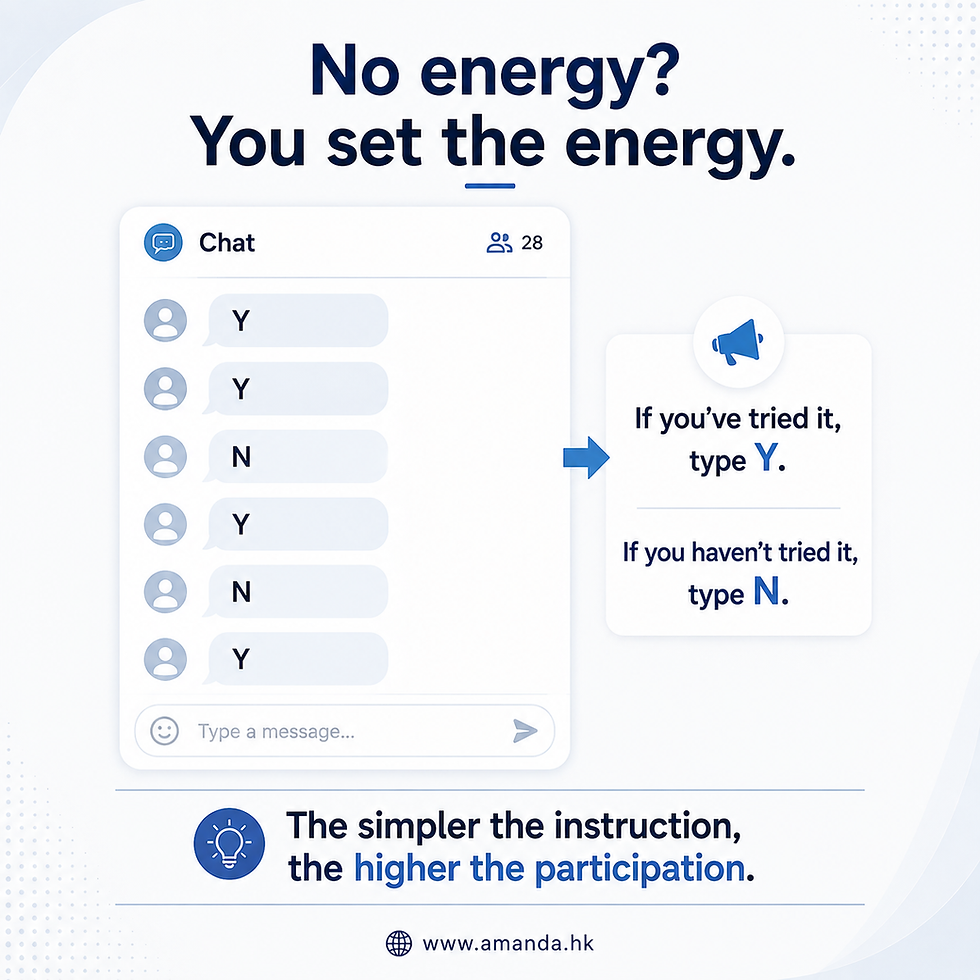
My method: invite reactions in the chat — with the simplest possible instruction. For example: "Type Y if you've tried it, N if you haven't." One tiny piece of design, and the session shifts from "me monologuing at a lens" to "the whole room participating."
Keep it simple — you're building engagement, not running a survey.
7. A Closing Word
On-camera presence isn't a gift. It's setup plus practice: eyes into the lens, light on the face, distance right, sound clean, background tidy, interaction designed.
Each one is a small thing. But with a camera in between, the small things are everything — because the only way anyone experiences you is through that little frame and your voice.
One fair caveat, though: these six fixes are the setup. Once the setup is right and the frame looks clean, the real contest begins — content and delivery. And those, you train.
Frequently Asked Questions (FAQ)
Q1: Should I look at the camera or the screen in a video meeting?
Look into the camera for your key moments — that's when the other person feels you're speaking to them; look at the screen when listening. Vision research finds that once your gaze strays roughly four to five degrees from the camera, perceived eye contact is lost — so when you look at the person on your screen, on their screen you appear to be looking down. News anchors reading into the camera work on exactly this principle.
Q2: What's the best camera and lighting setup for video calls?
Three basics: ① Face your light source (a window, or a lamp in front of you); never sit backlit, or your face falls into shadow and your presence suffers. ② Camera level with your eyes or slightly higher, roughly half-body in frame, a little space above the head. ③ On phone calls, use earphones — and resist letting the phone drift toward your face.
Q3: My online talks get no reaction — what can I do?
Design your own response mechanism. Invite the simplest possible chat reactions — "type Y if you've tried it, N if you haven't." The simpler the instruction, the higher the participation. Research also shows audio quality directly shapes how audiences judge both speaker and content — so clean sound (earphones or an external mic) is the foundation of engagement.
Want Your Team to Look as Professional on Camera as in Person?
My corporate training covers expression, voice and presence from face-to-face to on-camera. The Signature MC Training Course is also open for enrolment.
Learn more: https://www.amanda.hk/en/mc-training-workshop
Updated 2026
About the author | Amanda Fok
Hong Kong's "MC Godmother," a professional MC training mentor and ADHD coach, and an ADHD person herself. Champion of Hong Kong's first-ever territory-wide MC competition, with over 1,500 MC and hosting engagements and more than 10,000 students trained, she has authored and been lead writer on several books on MC work.
Amanda Training


Comments